Affected version: Horizon 4.0.0 (and all earlier versions) | Platform: Shopify | Status: ⚠️ No official fix yet – manual modification required
What happened?
Several customers reported that after clicking on Facebook and Instagram ads, they were unable to complete their orders in the affected online stores. Based on these complaints, we started debugging the issue, and after more than an hour of joint troubleshooting with Shopify's development team, we were able to identify and fix the problem.
The current 4.0.0 version of Shopify's Horizon theme contains a critical bug that makes affected stores completely unusable inside the built-in WebView browser of the Facebook and Instagram apps.
What symptoms did we observe?
- Navigation did not work — clicking menu items or product cards did nothing
- The page appeared to load, but no interaction was possible
- After switching away from the app and returning to the page, the first click sometimes still "reacted", but then the page froze again
- Products and categories would not open when clicked
- Adding products to the cart and placing an order was impossible
The issue only occurs on Android devices. Tested and affected devices include Samsung Galaxy S23, Galaxy S25, and Google Pixel 8.
The theme works correctly in desktop browsers, mobile Chrome, and on iOS devices. We were not able to reproduce the issue in the Prestige or Dawn themes — it appears to be specific to the Horizon theme.
⚠️ If you are running Facebook or Instagram ads for a store built on the Horizon theme, your ad traffic from Android users is currently being lost unless you act immediately.
How did we find the bug?
Based on customer feedback, we began testing the issue across multiple devices. Since we have built and maintain more than 50 Horizon-based Shopify stores ourselves, the scale of the problem became clear immediately: ads were underperforming across all affected stores, and the real cause had to be found in the theme's code.
We contacted the Shopify Support team, and with the help of technical specialists Kristopher and Naitikkumar, we carried out the debugging process together. During the investigation, we determined that the issue was caused by the incorrect implementation of the CSS View Transitions API and the related HTML meta tag.
The View Transitions API is a modern browser feature that enables smooth page transitions. However, the built-in WebView engine used by the Facebook and Instagram Android apps does not handle it properly, and as a result, the store's navigation becomes completely blocked.
The fix: two files need to be modified
Attention: The solution below is a temporary workaround until Shopify releases an official fix for the Horizon theme. After applying the fix, affected stores become functional again immediately.
How to open the code editor
Shopify Admin → Online Store → Themes → click the "..." menu next to Horizon → Edit code
Step 1
Find and open the assets/base.css file, then go to around line 226.
Keresd meg az alábbi blokkot:
/* view transitions */
@media (prefers-reduced-motion: no-preference) {
  @view-transition {
    navigation: auto;
  }
}
Change the value of navigation from auto to none:
/* view transitions */
@media (prefers-reduced-motion: no-preference) {
  @view-transition {
    navigation: none;
  }
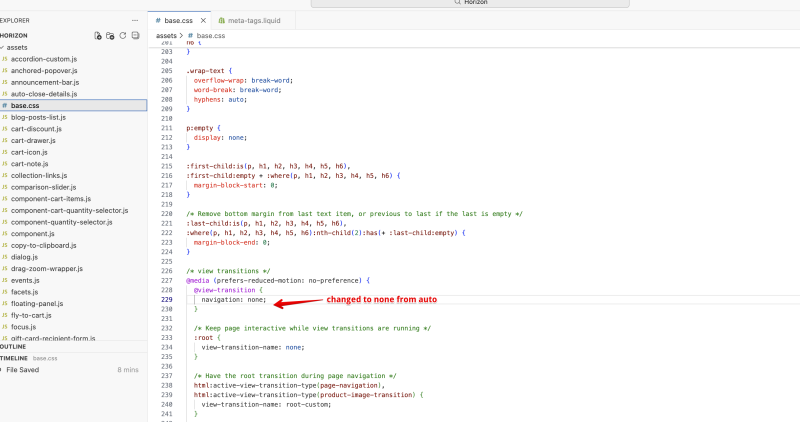
Screenshot by Naitikkumar (Shopify)
Step 2
Find the layout/meta-tags.liquid file.
Find the following meta tag:
<meta
  name="view-transition"
  content="same-origin"
>
Comment out the entire block:
{% comment %}
<meta
  name="view-transition"
  content="same-origin"
>
{% endcomment %}
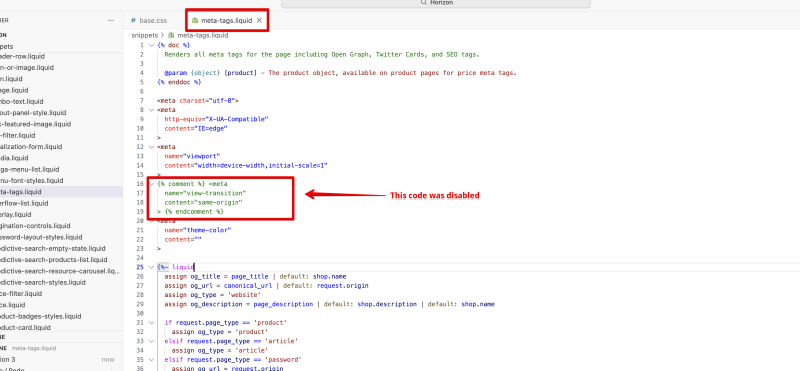
Screenshot by Naitikkumar (Shopify)
That's it!
Save and test
After saving both changes, test your store from the Facebook or Instagram app on an Android device. Navigation should start working immediately, even without clearing the cache — but to be safe, it is also worth clearing the browser cache.
The easiest way to test it
- Open your store's Facebook page on an Android phone inside the Facebook app
- Tap your website address in the "Links" field
- Your store will open in the built-in browser, and if everything was done correctly, you should be able to browse and purchase products.
Why can two small pieces of code cause such a major problem?
The View Transitions API (@view-transition: navigation: auto + <meta name="view-transition" content="same-origin">) is a relatively new web standard designed to make navigation between pages visually smooth, using animated transitions instead of the sudden "flash" that typically happens when the browser moves from one page to another. In modern desktop browsers and mobile Chrome, it works very well and genuinely improves the user experience.
The problem starts with the fact that the Facebook and Instagram Android apps do not use the device's built-in Chrome browser. Instead, they open links inside their own embedded WebView engine when you click a link within the app. In theory, this WebView engine supports the View Transitions API — but only partially, and with bugs.
Specifically, when a user clicks a link, the WebView starts the transition animation, but for some reason it never finishes it. The page gets stuck in an intermediate "limbo" state — the content is visible, but all click and navigation events are blocked, as if the transition were still in progress. The result is exactly what customers experienced: the page loads, but it becomes completely unresponsive to every interaction.
This also explains why the "switching windows" trick temporarily helped. Sending the app to the background and bringing it back forced a kind of reset in the WebView, briefly unlocking the frozen state. But with the next click, the same issue immediately returned.
Am I affected?
If your store uses the Shopify Horizon theme in any version — including the current latest version, 4.0.0 — and you are running Facebook or Instagram ads, then yes, you are almost certainly affected.
Reproducing the issue is simple:
- Open the Facebook or Instagram app on an Android device
- Navigate to your store's URL, for example by clicking a link shared in one of your own posts
- Try clicking on a product or menu item
If the page does not respond, your store is affected and you need to apply the modification described above.
When will the official fix arrive?
The issue has already been reported to Shopify's development team and has been added to their bug-tracking system. The fix is expected to arrive in an upcoming Horizon version update — but there is no confirmed release date yet.
Until then, follow the Horizon theme release notes or our Facebook page — we will notify you as soon as the official patch is released.
Need help?
If you do not have developer access, or if the modification needs to be applied across multiple stores, the TotalStudio team can help.